
Every visa file, every document, every deadline, on one screen.
Run a requirement check covering 80+ destinations for Indian passports, each rule with its official source and last-checked date, then open the right checklist for each traveller, collect documents through secure links, and track fees, appointments and the issued visa in one place.
- destinations in the requirement check for Indian passports
- 80+
- destinations with a checklist (28 fully checked)
- 40
- traveller profiles, from employed to minor, each with its own documents
- 6
- GST on your service charge; embassy and VFS fees can pass through as pure-agent costs
- 18%
- destinations in the requirement check for Indian passports
- 80+
- destinations with a checklist (28 fully checked)
- 40
- traveller profiles, from employed to minor, each with its own documents
- 6
- GST on your service charge; embassy and VFS fees can pass through as pure-agent costs
- 18%
A requirement check covering 80+ destinations for Indian passports
Pick the destinations and TourBrain shows what an Indian passport needs for each: visa-free, visa on arrival, e-Visa, ETA or an embassy visa. Every rule shows its official source and the date it was last checked. Rules still under review are clearly marked as unverified.
The check runs on the lead form as you type the destination, on every visa file and on its own page. Trip dates feed the stay limit everywhere, and on the check page you can add what the traveller already holds, such as a US or Schengen visa.
Checked rule
- Visa-free, visa on arrival, e-Visa, ETA or embassy visa
- Maximum stay, entries and the government fee, where published
- Usual processing time, where published, and any arrival card
- The official source, and the date it was last checked
Rule under review
Shown as "Unverified - check embassy", with no visa type, stay or fee presented as fact. Your team checks with the embassy before advising the client.
Every result, checked or not, carries the same line: guidance only, verify with the embassy or official portal.
- Spotted a change? Your team can report a rule as outdated, and it goes into our review queue
- Your agency can record its own reading for a destination; it shows next to ours, never mixed in
See all 83 destinations in the requirement check
56 were researched from official sources and agreed by an independent second check. 27 are still under review and show as unverified in the app. Data last checked 18 October 2026.
- Argentina
- Armenia
- Australia
- Austria
- Azerbaijan
- Bahrainunder review
- Belgium
- Bhutanunder review
- Brazilunder review
- Bulgaria
- Cambodiaunder review
- Canada
- China
- Croatiaunder review
- Cyprusunder review
- Czechia
- Denmark
- Egyptunder review
- Estonia
- Fiji
- Finland
- France
- Georgia
- Germany
- Greece
- Hong Kong
- Hungary
- Iceland
- Indonesia
- Ireland
- Israel
- Italy
- Japanunder review
- Jordanunder review
- Kazakhstan
- Kenyaunder review
- Kuwaitunder review
- Kyrgyzstanunder review
- Laos
- Latvia
- Liechtensteinunder review
- Lithuaniaunder review
- Luxembourg
- Macao
- Malaysia
- Maldivesunder review
- Maltaunder review
- Mauritiusunder review
- Mexicounder review
- Morocco
- Myanmarunder review
- Nepal
- Netherlands
- New Zealand
- Norway
- Omanunder review
- Peruunder review
- Philippines
- Poland
- Portugal
- Qatarunder review
- Romaniaunder review
- Russiaunder review
- Saudi Arabiaunder review
- Seychelles
- Singapore
- Slovakia
- Slovenia
- South Africaunder review
- South Korea
- Spain
- Sri Lanka
- Sweden
- Switzerland
- Taiwanunder review
- Tanzania
- Thailand
- Türkiye
- UAE
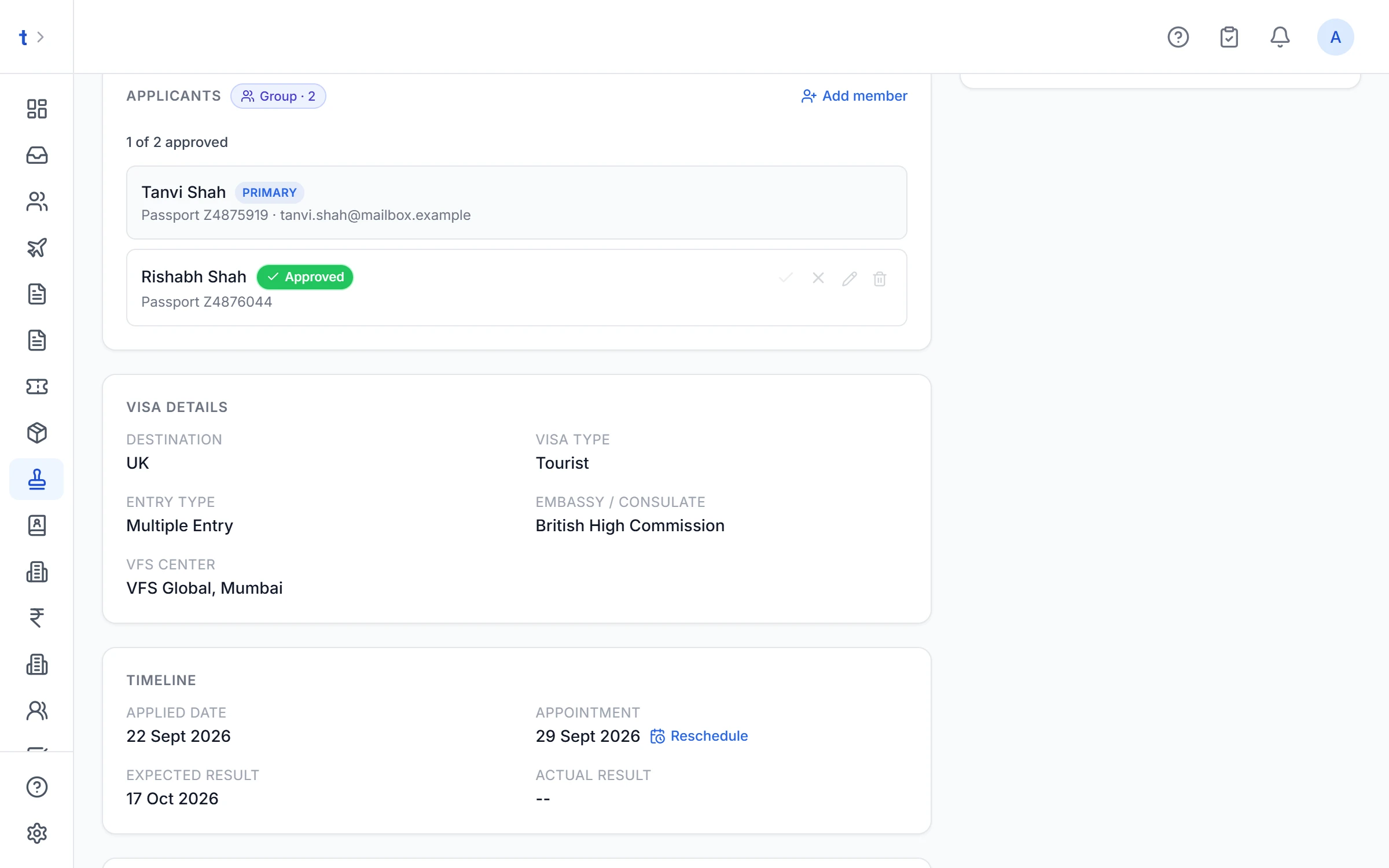
- UK
- USA
- Uzbekistan
- Vietnam
The right checklist for each traveller
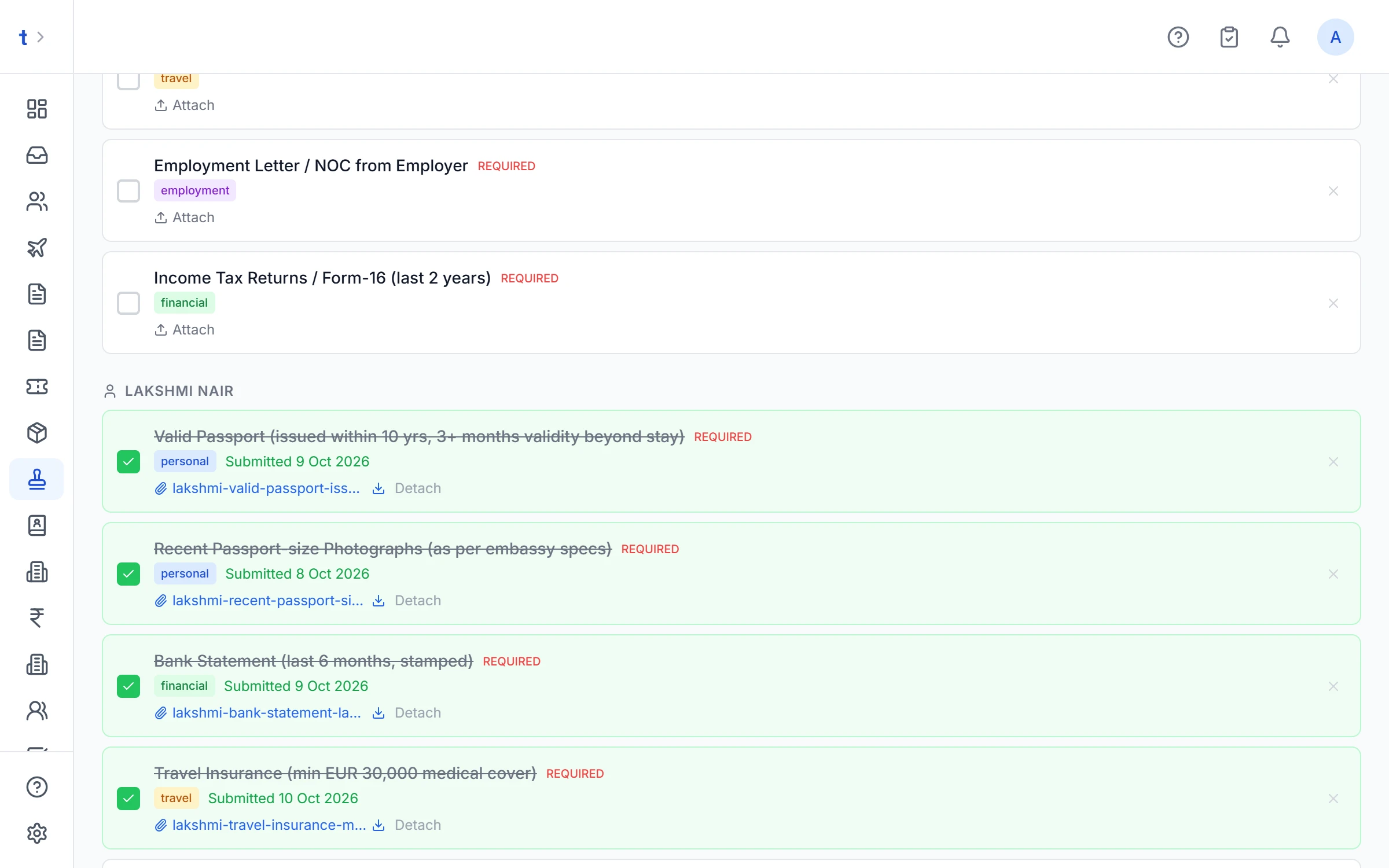
Open a file and the checklist follows the destination, the visa type (tourist or business) and each traveller's profile: employed, self-employed, student, retired, homemaker or minor. A student gets the student documents, a business owner gets theirs, on the same family file.
- Each item explains what's needed, with a link to the official page where there is one
- Shared documents appear once; per-person documents for each traveller
- Add, hide or reword items for your agency, or build your own list for a destination we don't cover
- When a list is updated, see exactly what changed and apply it; documents already collected stay put
Checklists for 40 destinations, 28 fully checked
- Argentina+ business
- Armenia
- Australia+ business
- Azerbaijan
- Bahrainunder review
- Cambodiaunder review
- Canada+ business
- China+ business
- Egyptunder review
- Georgia
- Hong Kong
- Indonesia+ business
- Ireland+ business
- Israel
- Japan+ business
- Jordanunder review
- Kazakhstan
- Kenya
- Kuwaitunder review
- Laos
- Malaysia+ business
- Maldivesunder review
- New Zealand
- Omanunder review
- Philippines
- Qatarunder review+ business
- Russiaunder review
- Saudi Arabiaunder review+ business
- Schengen area+ business
- Singapore+ business
- South Korea
- Sri Lanka+ business
- Tanzania
- Thailand+ businessunder review
- Türkiye+ businessunder review
- UAE+ business
- UK+ business
- USA+ business
- Uzbekistan
- Vietnam+ business
Every destination has a tourist list; the ones marked "+ business" have a business list too. France, Germany, Italy, Switzerland and the other Schengen countries open the one Schengen list. Lists marked "under review" open in the app as "Not verified", so check them with the embassy before you rely on them.
 Dubai
Dubai Thailand
 Bali
Bali
A checklist PDF on your letterhead
Send clients the checklist as a PDF with your agency logo, marking what's attached and what's missing. In the app, the checklist links to the official form where the country has one, and checklists built from our researched lists carry a "guidance only, verify with the embassy" line.
Every traveller uploads their own documents
Tap "Request documents" and each traveller gets their own secure link by email, showing only their checklist. They upload from their phone; each document lands on the right line of the file.
- Several pages per document: passport front and back, a six-page bank statement
- Your team can join photographed pages into one PDF in one click
- Reject a document with a reason and the traveller is told what to fix
- A link never shows the documents a traveller uploaded, so a forwarded link doesn't expose their passport scans
- Links expire after 30 days and switch off when a file is rejected or cancelled
Links go by email today, and you can copy a link to share it yourself. Sending them on WhatsApp is coming soon. You can also choose to send links automatically when a file is created.
A live tracker for every traveller, and the visa delivered to them
Once documents are in, the same link becomes the traveller's tracker. Fewer "any update?" calls to your desk.
- Where the file is now, step by step
- The next appointment: date, centre and address
- Any document that needs redoing, with the reason
- The fee still due, with a Pay now button for the main traveller when you've created a payment link
- Their own visa copy to download once it's issued
Issued visa delivery
Upload the e-visa or stamped copy for each approved traveller. It's emailed to them with the copy attached, and it's in their customer portal under Visas & Passports. Each traveller sees only their own copy.
Pay now on the tracker
Razorpay payment links on the visa invoice are on Professional and Enterprise. On Growth the tracker shows the amount due.
Status your team can't skip
Every file moves through the same stages, in order. Nobody marks a file approved before it reaches processing, and a rejection always records a reason. When the embassy asks for more documents, the file goes back to collecting without losing its history.
- Below the stage, the file shows where it really is: appointment booked, biometrics done, passport with the embassy, decision received
- Visa number and validity can be corrected after approval
The seven visa stages
- Not started
- Collecting documents
- Documents submitted
- Processing
- ApprovedRejectedCancelled
A file can be cancelled at any open stage, and even after approval. To try again after a refusal, re-apply: see desk tools.
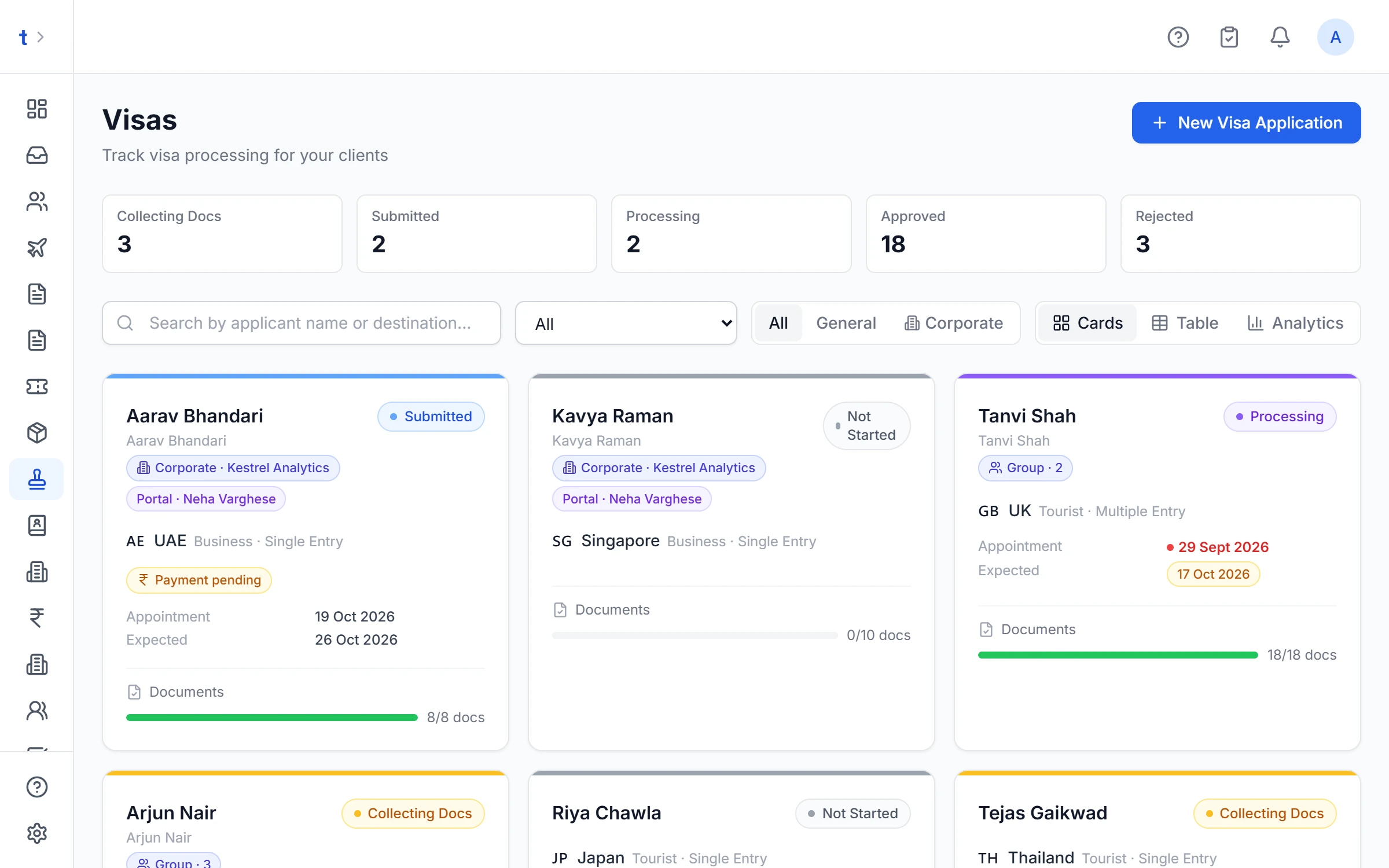
Families and groups in one file
Each member gets their own checklist items, their own upload link and their own outcome; shared documents appear once.
- Each member's passport, email and mobile kept on their own row
- One member approved and another refused? Each outcome is recorded, with the reason
- Members can have their own appointment, or share the file's
Clients kept informed, in your agency's name
Status emails carry the details that matter: the refusal reason and next steps, the visa number and validity on approval, what the embassy asked for, and the appointment time, centre and what to carry. Your team stops typing the same message five times.
- Email
The main applicant and every group member with an email, sent in your agency's name with your logo and reply-to.
- Tracker link
Each traveller's own link shows the new stage, the next appointment and anything still needed.
- WhatsApp
A short status update to the main applicant on WhatsApp, from your own connected number or TourBrain's shared one.
Detailed WhatsApp messages are coming soon. Today the details go by email.
- Corporate portalProfessional
The client's travel desk sees requests they raised move in their portal feed.
Every rupee on the file, and a GST-correct invoice in one click
Record each payment and refund with the mode, date and reference. The balance and the status (unpaid, part paid, paid or refunded) work themselves out. Raise the invoice from the file and GST lands only where it belongs.
- Payments against the invoice show up on the file, and the other way round
- Fee reminders to your team and the client keep going after approval while money is still owed
- Money paid to and received back from VFS tracked as an advance
- Visa fees go straight into the holiday quote: pass-through fee and service fee on separate lines
- Fee changes and payments are limited to finance roles (owner, manager, accountant and visa executive by default), and every change is logged
How the invoice is built from the file
- No GST added
Government / visa fee
Paid on the client's behalf as a pure agent
- No GST added
VFS or BLS fee
Passed on at the receipt amount as a pure agent; VFS's own GST is already in its fee
- 18% GST
Your service charge
Heading 9985; confirm the code and rate with your CA
- Your choice
Add-ons: courier, lounge, insurance, dummy ticket
Pass-through, or taxable at 18% when it's your own fee
The invoice notes that the government and VFS fees were paid as a pure agent, so you add no GST on them.
Appointments, biometrics and the passport, always accounted for
Book biometrics, interviews and submissions at VFS, BLS, TLScontact, CKGS or the embassy against the file or a single traveller, with the booking reference. Reschedules keep a history of who moved it, when and why.
- Clients get a reminder email two days and one day before, with a calendar invite
- The assigned team member is reminded too
- Mark each appointment attended or missed
- Know where every passport is: with the traveller, your office, the visa centre or the embassy, or with the courier (with its AWB number)
- e-Visa application number and submission reference on the file, with a link to the official tracking page

Built for a busy visa desk
Everything your team needs to know what's theirs, what's due today and what happened last time.
Re-apply as a new attempt
After a refusal, re-apply in one click. The new attempt carries the documents, members and checklist; the refused attempt and its reason stay on record.
My queue
Assign each visa file to a team member. Everyone sees their own queue, and the list shows who owns what.
Today
Today's appointments, the next seven days, past slots with no outcome yet, and files ready to submit with nothing booked.
Find any file
Search by client, group member, passport number or visa number, and filter by destination.
Export to Excel or CSV
Export the visa or passport list. Passport numbers are included only for roles allowed to see them.
Daily alerts
A daily check flags passports with less than six months' validity on active files, and fees falling due or overdue.
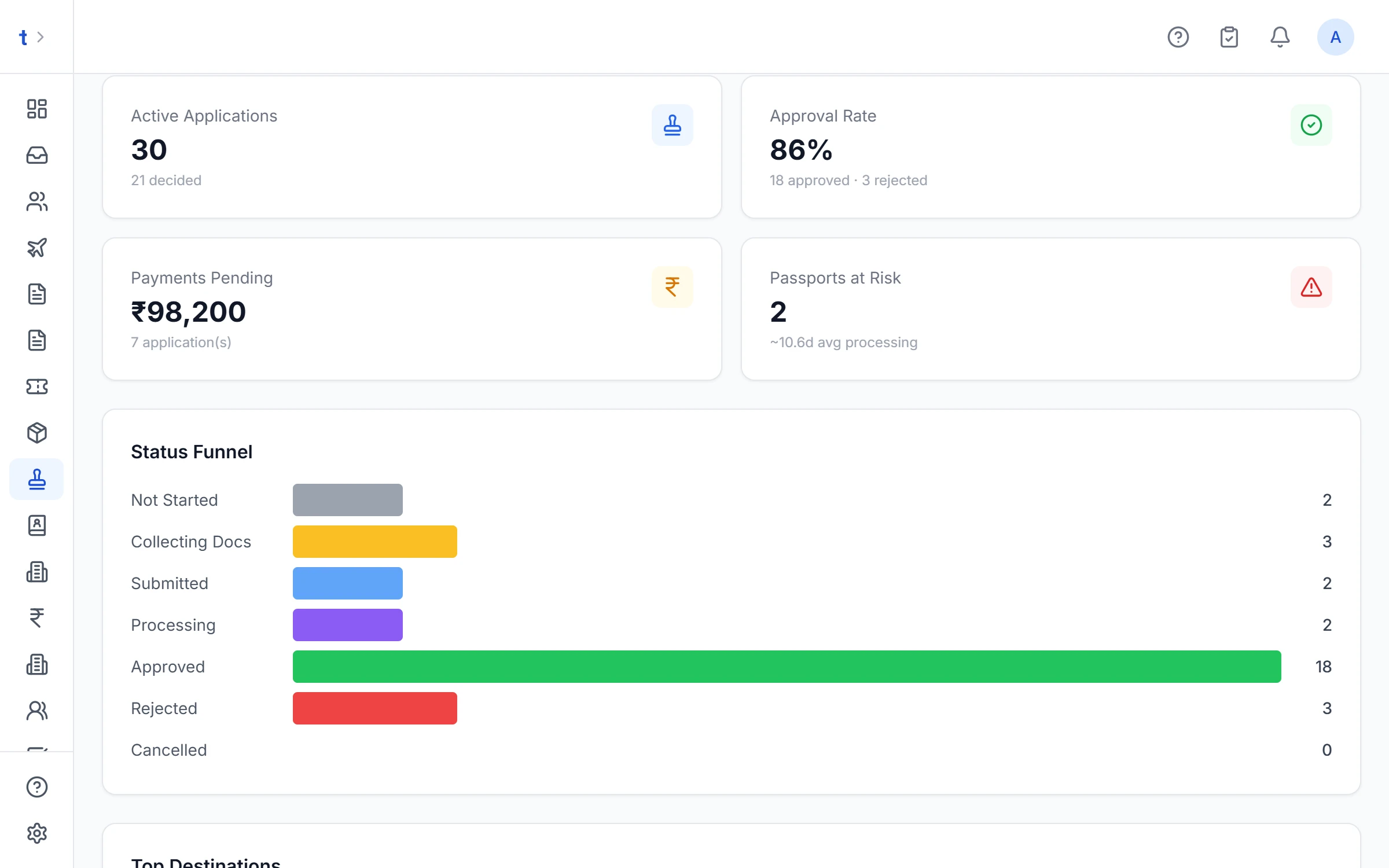
See the whole visa desk at once
Active files, approval rate, top destinations, upcoming appointments, money still owed and passports at risk, with a six-month trend.
- Files by stage and by destination
- Appointments in the next 14 days
- Balances owed on live files and advances sitting with VFS
- Corporate and general files split out
Passport files that follow Passport Seva
Fresh, renewal, tatkal, minor and reissue checklists. Nine stages that follow Passport Seva, with PSK appointments, police verification and the issued passport saved back to the contact.
- PSK appointment with reschedule history
- Police verification tracked on the file
- The same upload links, payments ledger and GST invoice as visa files
- The new passport number and expiry update the client's contact, ready for their next visa
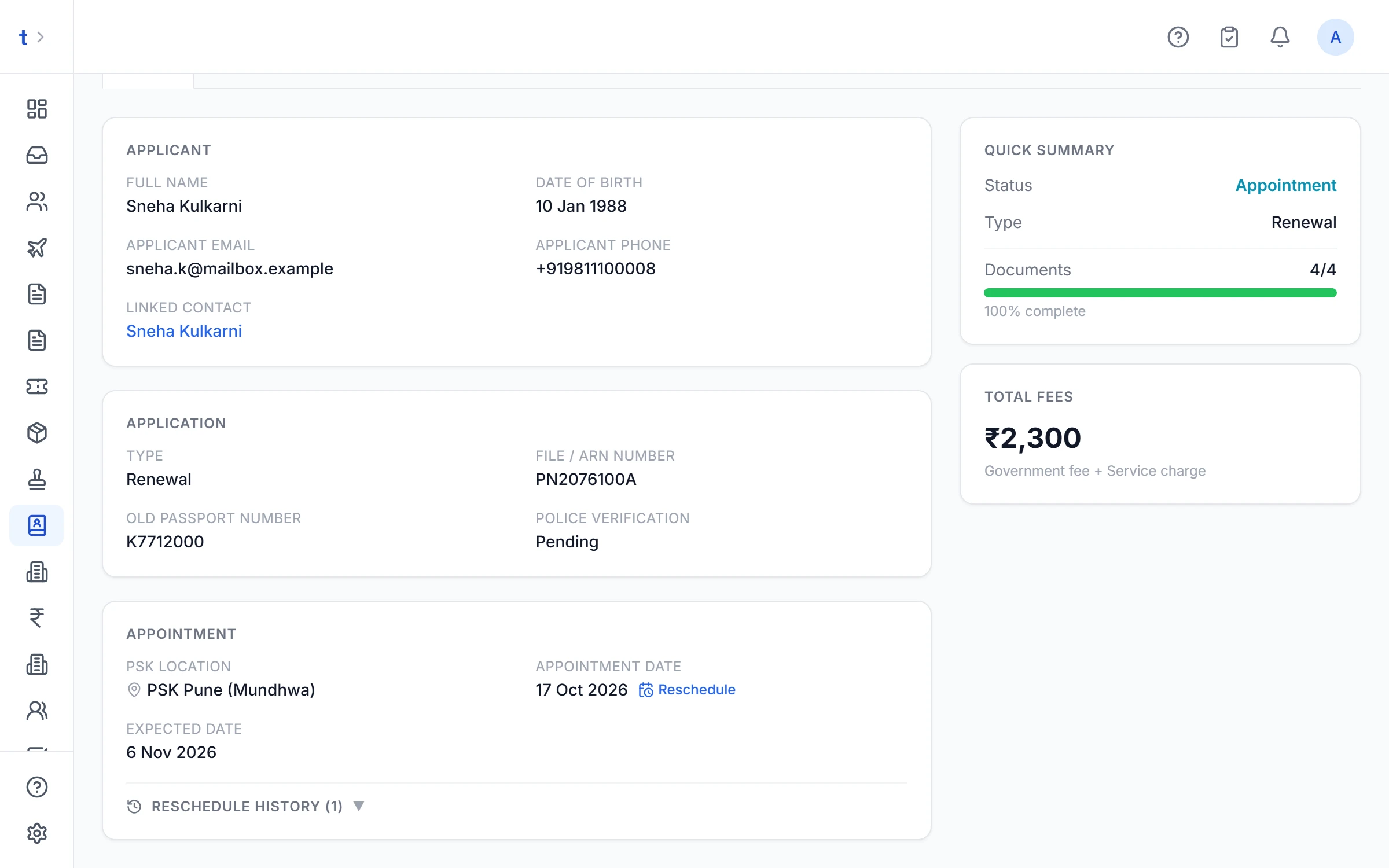
The passport stages
- Not started
- Collecting documents
- Submitted
- Appointment scheduled
- In process
- Dispatched
- IssuedRejectedCancelled
Walk-in files can go straight from Submitted to In process, and e-passports from In process to Issued.
Connected to the rest of TourBrain
The visa desk isn't a separate app. Files start from the enquiry and feed back into the trip.
One tap from a lead
Turn a visa enquiry into a file in one tap: the whole party added as members, and the documents ticked on the enquiry already on the checklist.
Passport details typed once
Passport number and expiry are shared between the contact and the visa file, in both directions.
Trip visa needs worked out
A trip lists the countries each traveller needs a visa for, from its flights and hotels, leaving out your home country, and stays in step with the visa files.
Corporate files tagged
Visas for a corporate client's employees are tagged to that client's account.
A visa desk for your corporate clients
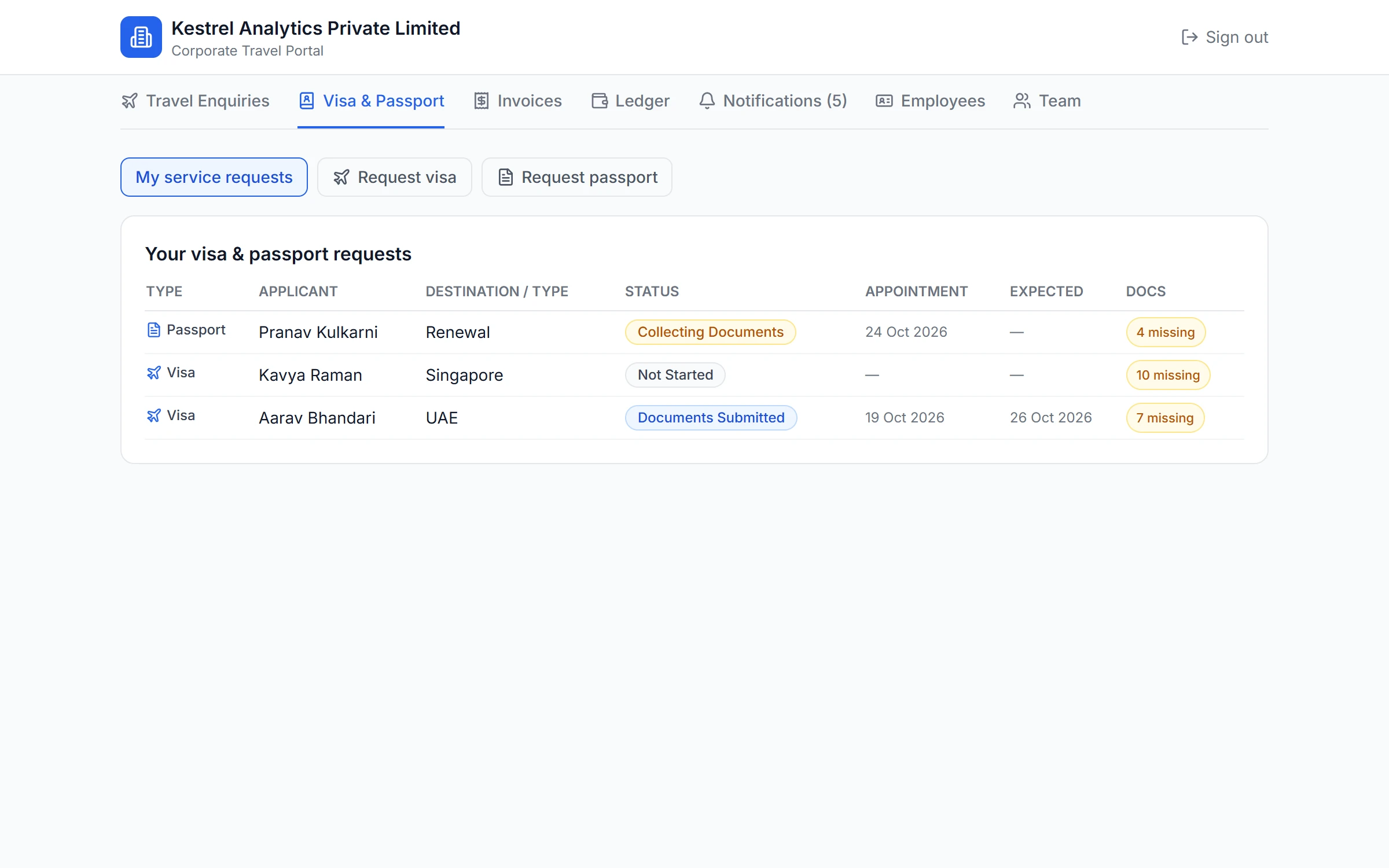
Your corporate clients' travel desk raises visa and passport requests from their portal, sees the document checklist before sending, and each request arrives as a ready file. Status updates flow back to their portal feed.
Part of the Corporate / TMC module on Professional and Enterprise
Guides
Visa rules for Indian passports in 2026: what changed
Thailand, Malaysia, Sri Lanka, Vietnam, Indonesia, Turkey and the UAE: what to update in your checklists.
Read the guideSchengen visa checklist for Indian applicants
The document list split by employed, self-employed, student, retired and minor travellers.
Read the guideHow to run a profitable visa desk
Price the service, keep pass-through fees separate, track appointments and passports, and measure approval rate.
Read the guideGST on visa services: the pure agent rule
Embassy and VFS fees as pass-throughs, 18% on your service charge, and the invoice mistakes to avoid.
Read the guide
Questions agencies ask about the visa desk
What is the best way to manage visas in a travel agency CRM?
Keep every visa as a file linked to the enquiry and the trip, not in a separate spreadsheet. In TourBrain a visa file starts from the lead in one tap, runs a requirement check covering 80+ destinations for Indian passports, opens the right checklist for each traveller, collects documents through secure upload links, and tracks fees, appointments and the issued visa on the same screen.
How does TourBrain know what visa an Indian passport needs?
For each destination it shows whether an Indian passport is visa-free, visa on arrival, e-Visa, ETA or embassy visa, with the official source and the date the rule was last checked. Rules still under review are marked unverified. It is guidance, not visa advice, so always confirm with the embassy or official portal.
Can clients upload their visa documents themselves?
Yes. Each traveller gets their own secure link by email showing only their checklist, and uploads from their phone. The same link later becomes a tracker showing the file's stage, the next appointment and any document to redo. Links expire after 30 days. Sending links on WhatsApp is coming soon.
How should a travel agency charge GST on visa services?
Embassy and VFS fees paid on the client's behalf can be billed as pure-agent pass-throughs at 0%, and your service charge carries 18% GST (SAC 9985). TourBrain raises the visa invoice with those lines split. Whether the pure-agent conditions in Rule 33 of the CGST Rules apply is for your chartered accountant to confirm.
Does TourBrain book VFS appointments or submit visa applications?
No. It does not book embassy or VFS slots, submit applications or pull live embassy status. You record appointments at VFS, BLS, TLScontact, CKGS or the embassy, and TourBrain reminds the client and your team and tracks where each passport is.
Which TourBrain plan includes the visa desk?
The Visa & Passport desk is on Growth (₹549 per user a month plus GST) and above, and every new workspace can use it during the 14-day trial.
See the visa desk on your own files.
Book a demo and we'll walk through a family Schengen file end to end, or start a 14-day trial and open your first file today.