Itinerary Builder Software for Travel Agents
Stop rebuilding the same Kerala or Dubai plan in Word every week. In TourBrain, AI drafts a day-by-day itinerary from the trip details, you edit it, and it goes out as a PDF with your logo. When the client says yes, the same plan becomes a priced quote.
Just want to see the AI? Try the free AI itinerary maker. No sign-up.
How it works
Four steps from a client's enquiry to a plan they can read, and a quote they can accept.
Draft with AI, or start blank
Give AI the trip details and it drafts a day-by-day plan. From a lead, Draft itinerary uses what the lead already holds.
Edit every day
Change any activity, drag days and activities into a new order, and set the hotel and meal plan for each night.
Send it with your name on it
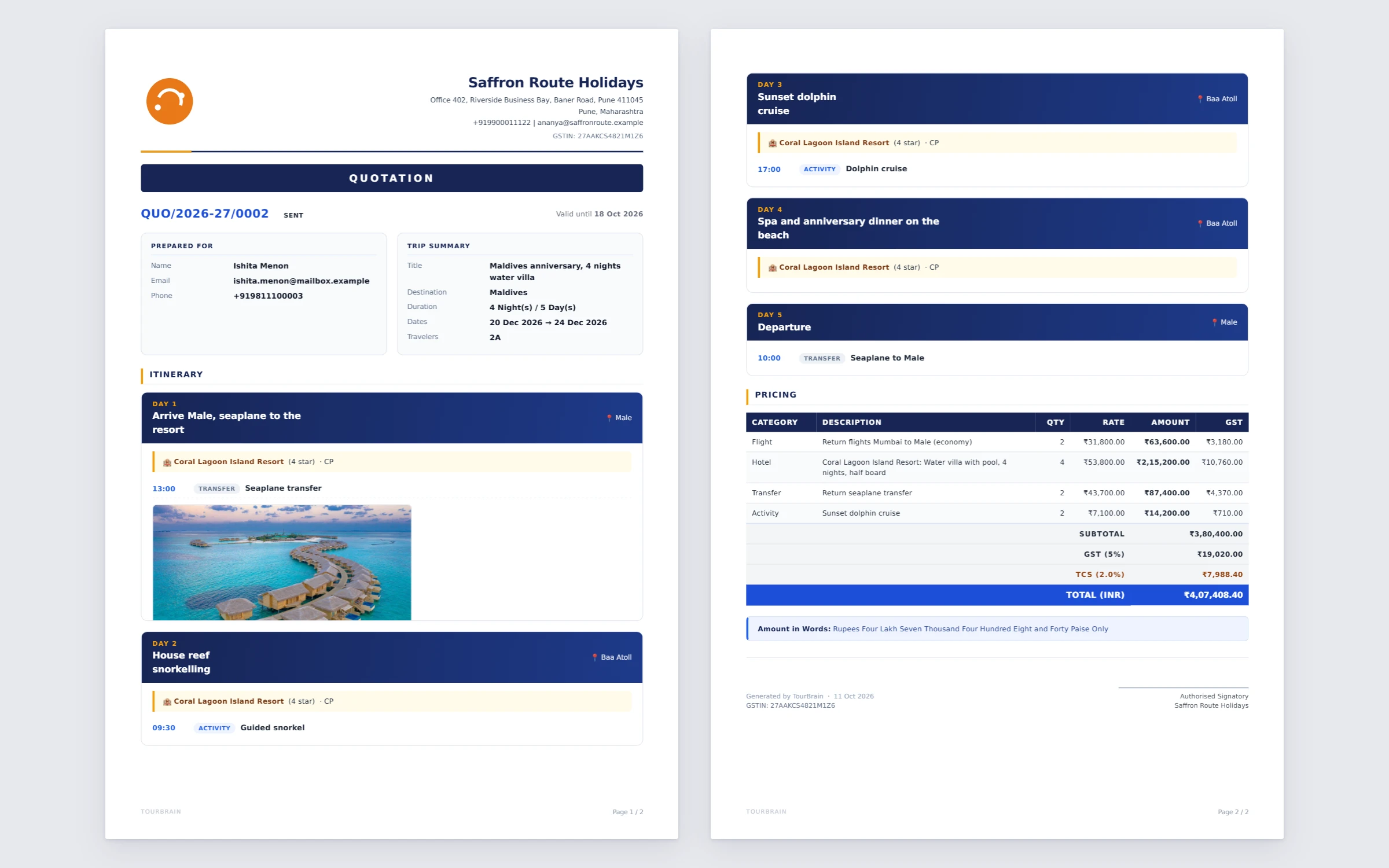
Download the itinerary as a PDF with your logo and GSTIN, ready to share on WhatsApp or email.
Turn it into a quote
One click creates a quotation from the plan, or opens the lead's draft quote, so you price it without typing the days again.
An AI draft built from your client's brief
Only the destination and the number of nights are required. The more you add, the closer the draft gets to what your client asked for, so you spend your time on the details only you know.
- Destination and nights
- Start date and origin city
- Children's ages
- Comfort level and pace
- Hotel category and meal plan
- Occasion, such as a honeymoon
- Interests and dietary needs
- Places to include, things to avoid
AI itinerary
A day-by-day itinerary drafted with AI, ready to edit.
- A day-by-day itinerary drafted with AI
- Edit every day before it goes to the client
- Preview and download the itinerary as a PDF
What your agency gets
An itinerary in TourBrain is a working document, linked to the lead, the quote and the trip.
Cover image
Upload a cover photo for the destination so the PDF opens like a brochure.
Day photos and flight tickets
On a quote's itinerary, add sightseeing photos to a day and flight ticket images. Both print in the PDF.
Inclusions and exclusions
List what's included and what isn't, so there are no surprises at check-in.
Your own templates
Mark a plan you sell often as a template. It appears under Start from template on every new quote.
Costs as you build
Add hotel and activity costs per day and see the plan's total cost add up.
AI drafts every month
50 AI generations a month on Growth and 200 on Professional, shared across AI features.
Free AI itinerary maker, no sign-up
Pick a destination, the nights and who's travelling. Download the plan, copy it for WhatsApp, or save it to a TourBrain workspace.
Draft an itinerary nowTravel itinerary format to download
Prefer to start by hand? Get a free day-by-day format with hotels, transfers, meals and inclusions, in Word, Excel or PDF.
Get the itinerary formatHow TourBrain is different
Standalone itinerary tools stop at the PDF. In TourBrain the itinerary is one step in the sale.
Linked to the lead
Draft the plan straight from an enquiry, with the travellers and dates the lead already holds.
Linked to the quote
Price the same days with per-person rates, GST and TCS, and send both together.
Linked to the trip
Once the quote is accepted it converts to a trip, and the plan travels with it.
Your team decides
AI drafts; you edit. Nothing goes to a client without someone on your team sending it.
Itinerary builder questions
What is itinerary builder software for travel agents?
It is a tool for making day-by-day travel plans that you can send to clients. In TourBrain you draft the plan with AI or by hand, set hotels and meal plans for each night, download it as a PDF with your logo, and turn it into a priced quote without retyping.
Can I try the AI itinerary maker without signing up?
Yes. The free AI itinerary maker on our website needs no sign-up and no phone number. You can download the plan or copy it for WhatsApp, and save it to a TourBrain workspace if you start a trial.
Can I edit the itinerary AI drafts?
Yes, every part of it. Change activities, reorder days and activities by dragging, and set the hotel and meal plan per night. Nothing reaches a client until you send it. Check timings and opening days before you send, as you would with any draft.
Does the itinerary PDF carry my agency's branding?
Yes. The PDF shows your logo and GSTIN, a cover image if you add one, each day's plan with the hotel and meal plan, and your inclusions and exclusions.
Can an itinerary become a quotation?
Yes. Create a quotation from the itinerary in one click. You can also mark a plan as a template so it appears under Start from template on every new quote.
How much does the itinerary builder cost?
It is part of every TourBrain plan: Growth at ₹549 and Professional at ₹1,099 per user a month, plus 18% GST. Growth includes 50 AI generations a month and Professional 200. There is no free plan, but every new agency gets a 14-day free trial of Growth with no card.

Build your next itinerary in TourBrain.
Start a 14-day free trial of Growth, no card needed, or book a demo and we'll build one with you.