WhatsApp CRM for Travel Agents
Your clients already plan their holidays on WhatsApp. TourBrain puts those chats in one inbox your whole team shares, turns each new enquiry into a lead, and sends quotes, invoices and vouchers back on WhatsApp, with follow-ups that don't depend on someone's memory.
No card needed. Growth and Professional plans, plus 18% GST.
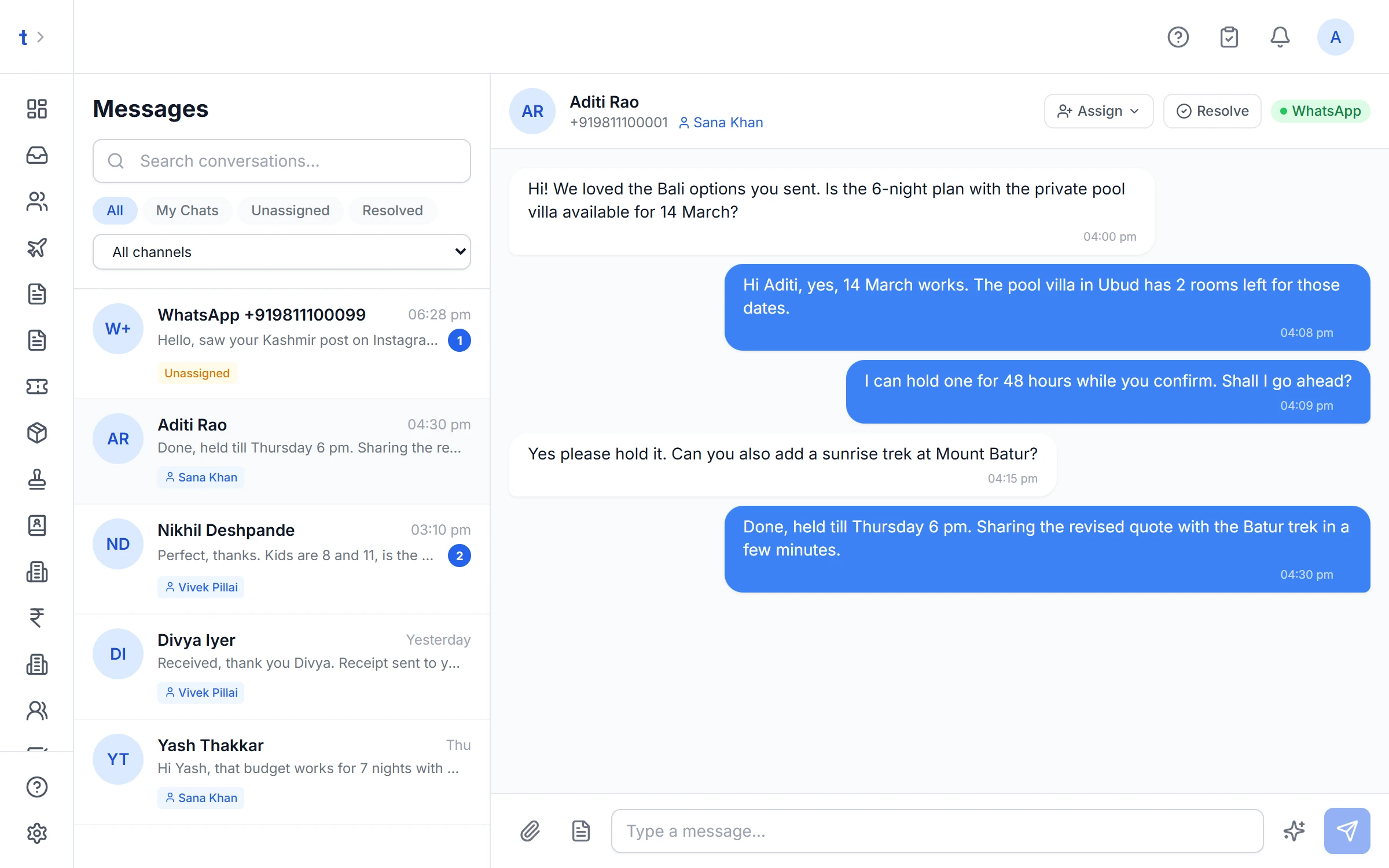
How it works: from first message to follow-up
Most enquiries start as a WhatsApp message on someone's phone. Here is what happens to one in TourBrain.
A new number writes in
TourBrain creates the contact and a lead on your pipeline board, with a score, so nobody has to copy the number into a register.
Someone on the team picks it up
The chat sits in one shared inbox. Assign it to a teammate, filter by My chats or Unassigned, and mark it resolved when it's done.
AI turns the chat into a lead
Click Create lead from this chat. AI reads the conversation and fills the lead form: destination, dates, travellers, budget. You check it and save.
The quote goes back on WhatsApp
Send the quote as a branded PDF on WhatsApp, with a link where the client can accept it or ask for changes.
Follow-ups don't slip
Each open lead carries a next follow-up date. The Follow-ups due button on the leads page shows everything due today, overdue ones included.
Turn a messy chat into a clean lead
Clients write things like "4 of us, Bali, Dec end, around 2.5L". Paste that, or open the chat in the inbox, and AI fills the lead form for you to check. It works with English, Hindi and Hinglish.
- Destination, dates, nights, adults, children and child ages, budget, hotel category and meal plan
- Phrases like "Dec end" or "next month" become real dates
- Fields AI is unsure of are flagged with the exact words they came from
- Anything the chat doesn't say stays empty; AI doesn't make values up
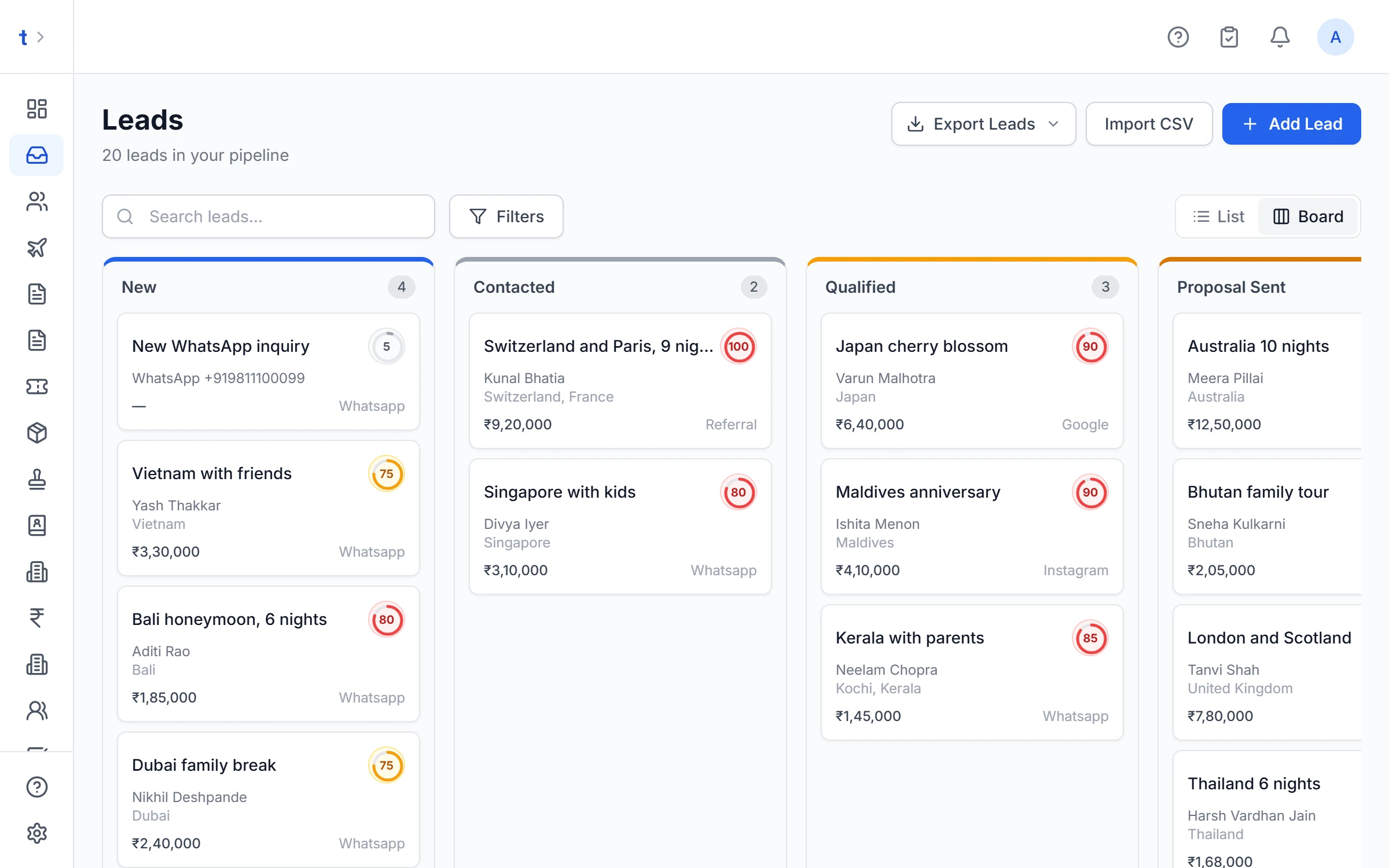
What your agency gets
The inbox is tied to the rest of TourBrain, so a chat, a lead, a quote and an invoice all belong to the same client.
Send photos, PDFs and videos
Share hotel photos, a visa checklist or a ticket from the inbox, up to 16 MB per file.
Templates after 24 hours
WhatsApp allows free text only within 24 hours of the client's last message. After that, TourBrain switches you to approved templates.
Suggested replies
Ask AI for reply suggestions on an open chat. Pick one, edit it, then send. Nothing goes out on its own.
Invoices and vouchers too
Send invoices, payment reminders, hotel and flight vouchers and itineraries on WhatsApp from the same records.
Your own number
Connect your agency's WhatsApp Business number through Meta's sign-up flow, so clients see your name.
- Professional
Campaigns on Professional
Send a template message to a contact list, and see replies against the campaign.
How TourBrain is different
Many WhatsApp tools for travel agents are a shared inbox and a broadcast list. TourBrain is a full travel CRM where WhatsApp is one channel into the same records.
Built for travel, not general sales
Leads carry destinations, travel dates, child ages and meal plans. Quotes carry per-person rates and package options.
The same records, start to finish
The chat, the lead, the itinerary, the quote, the trip and the GST invoice all hang off one contact.
India-first money
GST on your service charge, TCS on overseas packages, and INR pricing on every plan.
Official API only
Messages go through Meta's WhatsApp Business Platform with approved templates, not a browser extension or an unofficial workaround.
WhatsApp CRM questions
What is a WhatsApp CRM for travel agents?
It is a CRM where WhatsApp chats are part of the client record. In TourBrain every chat sits in a shared team inbox, a message from a new number becomes a lead, and quotes, invoices and vouchers go out on WhatsApp from the same place you build them.
Can my whole team use one WhatsApp number?
Yes. Everyone works from one shared inbox. Each chat can be assigned to a teammate, and the inbox filters by All, My chats, Unassigned and Resolved, so two people don't answer the same client.
Can I use my agency's own WhatsApp number?
Yes. Connect your WhatsApp Business number from Settings through Meta's own sign-up flow. Once connected, Meta bills its message charges to your WhatsApp Business account. TourBrain uses Meta's official WhatsApp Business Platform, not the phone app, so past chats on your phone are not copied in.
Does TourBrain create leads from WhatsApp messages automatically?
A message from a number that isn't in your contacts creates a contact and a new lead on your pipeline. For an existing chat, Create lead from this chat lets AI read the conversation into a lead form that you check before saving. AI leaves out anything the chat doesn't say.
Can I send quotations on WhatsApp?
Yes. Send Quotation lets you tick WhatsApp, email and a public link. On WhatsApp the client gets the quote PDF with your logo, and the link lets them accept it, pick a package option or ask for changes.
Which plan includes the WhatsApp inbox, and is there a free plan?
The WhatsApp inbox and templates are on Growth (₹549 per user a month) and Professional (₹1,099 per user a month), plus 18% GST. Campaigns are on Professional. There is no free plan, but every new agency gets a 14-day free trial of Growth with no card needed.
Related pages

Bring your WhatsApp enquiries into one place.
Start a 14-day free trial of Growth, no card needed, or book a demo and we'll show you the inbox with your own enquiries.